Procedural Animation Devlog
Introduction
While I was just starting out in game development, a few videos (specifically by Codeer and t3ssel8r) popped up on my recommended showcasing procedurally animated creatures. After watching some videos, I decided to try and create my own system. Now that I have built the core system behind a procedurally animated spider, I wanted to cover all of the math, code and logic for anyone interested.
Technical Details
Since I have another devlog on how the leg joint orientations are calculated, I will not be covering it in here. We can also simplify the system to only calculate the target position and completely ignore anything to do with the legs. Therefore, we would only really need to calculate target position/orientation along with the body position/orientation.
Parenting Structure
Since I did make this in Unity, how the objects are parented is crucial to making the spider controller actually work. Here's how I parented the objects in my project:
Spider (what is moved and everything follows it)
-> Body (the rendered body)
    -> Pivots
        -> Pivot 1..n
    -> Ground Targets
        -> Ground Target 1..n
-> Legs
    -> Leg 1..n
        -> IK Target 1..n
Essentially, this parenting structure moves the pivots and ground targets to follow the body's orientation and its position. I separated the body from the main spider transform so I could keep its transform preserved locally in case it is needed for systems like pathfinding. This is a preference thing though so if your goal isn't to use it as a mob in a game, you can probably structure it as so:
Body
->   Pivots
    ->   Pivot 1..n
->   Ground Targets
    ->   Ground Target 1..n
->   Legs
    ->   Leg 1..n
        ->   IK Target 1..n
Pivots and Ground Targets are not actually required in both cases as they are just there for organization. The Legs parent, however, is required and needs to be at the origin with no orientation or else it can mess with the inverse kinematics in each leg.
Logic Flow
Now that we got the parenting structure out of the way, let's talk about the logic of how we are going to move each leg and how I came to my answer.
Leg Logic
The legs have two "targets", the ground target and the IK target. The inverse kinematics target (IK target) is just the end effector of the actual IK system and the ground target is used to calculate where to place the IK target.
I made the ground targets shoot a raycast straight down from their position to calculate the IK target position. This must be changed if you wanted to incorporate wall-climbing.
We then simply interpolate the leg's end effector towards the ground target if the distance is greater than maxLegDelta.
Update Loop
Since that was only the leg logic, we do need to talk about the role that it plays within the scope of the entire update loop. This leg logic is only used for detecting when to move the IK target and then moving the legs towards that target then repeating it.
There are still other things we need to calculate like the body's height and orientation which are both based off the leg positions. The body's transform should be calculated before the legs but after the legs are initialized.
Using this we can form a basic update loop like so:
void Update() {
    // Make sure the leg parent's position and rotation are zeroed to prevent errors
    legParent.position = Vector3.zero;
    legParent.rotation = Quaternion.identity;

    if (legsInitialized) {
        CalculateBodyHeight();
        CalculateBodyTilt();
    }

    UpdateLegs();
}
Although this could work, if we wanted the spider to look more realistic (and not like a water skipper), we will need to figure out a way to alternate the legs.
So let's separate our legs into two leg groups, the left legs and the right legs, and give each of them an offset (as to not have both legs across from each other to move in sync). Now UpdateLegs() should be replaced by something like this:
UpdateLegGroup(leftLegs, 0);
UpdateLegGroup(rightLegs, 1);
Let's now define UpdateLegGroup() to actually incorporate this:
void UpdateLegGroup(Legs[] legGroup, int offset) {
    for (int i = 0; i < legGroup.Length; i++) {
     Leg leg = legGroup[i];

        // Anchor the leg's "shoulder" to be at the pivot.
        leg.transform.position = leg.pivot.position;

        if (Vector3.Distance(leg.target.position, leg.groundTarget.position) > maxLegDelta
            && ((i % 2 == offset) == groupOneMoving) && !leg.isStepping) {
           //  Most likely a thread due to it needing to be interpolated over time
            StartCoroutine(MoveIKTarget(leg.target, leg.groundTarget.position));
        }
    }
}
I used a normal for loop here as we need i for alternating legs and to explain the if statement, here's what we want to check:
Vector3.Distance(...) > maxLegDelta- that the distance is large enough to move the IK target to the ground target-
(i % 2 == offset) == groupOneMovinggroupOnein this case would be theleg0of that group and by using the offset ini % 2 == offsetwe can add an offset so that both sides don't move the same index leg at the same time.
-
!leg.isStepping- that the IK target is not already interpolating towards the ground target. This one is important!
Full Script Explanation
For the sake of simplicity (and not writing documentation for my second order dynamics system), I will use the spider controller that uses linear interpolation instead.
Variables
The Leg Class
This class has quite a bit of variables and this is stored per leg:
public Transform pivot;
public Transform groundTarget;
public ThreeLinkV2 leg;

// below are all hidden in the inspector
public bool initialized = false;

public Vector3 startPosition, targetPosition;
public Vector3 startUp, targetUp;

public float restTimer;
public float startInterpolationTime;
public bool isStepping = false;

public Vector3 rawUp;
public Quaternion skewRotation;
References
pivot- the "shoulder" position on the body. Essentially the position the leg should be fixed to.groundTarget- the desired landing point on the ground.leg- reference to the IK solver. Only the third link length and IK target are accessed through this script.
If pivot and groundTarget were on a 2D plane, pivot = (0, 1) and groundTarget = (2, 3), then intuitively the distance between where the leg's end effector and the pivot would aim to be $2\sqrt2$ units apart.
Stepping Interpolation
initialized- whether the leg has touched the ground at least once and has valid starting values.startPosition,targetPosition- the start and end positions for the step interpolation.startUp,targetUp- the start and end up vectors for rotation in the interpolation.restTimer- how long the leg has been idle before forcing a step to correct its "posture". Essentially ensures that the spider isn't in some half-way step.startInterpolationTime- used in interpolation since it lerps over a certain interval.isStepping- whether the leg is currently interpolating. Needed otherwise it will stay frozen atstartPositionforever.
startUp and targetUp could be replaced with Quaternion startRot, targetRot while using Quaternion.Slerp. The up vectors only exists since this was adapted from a system that only accepts vectors.
Leaning/Velocity-based Rotation
rawUp- the unmodified up vector used as the base for leaning.skewRotation- the velocity-based rotation applied onrawUp.
Float Parameters
// Cosmetic Settings
float distToLegCentre = 0.5f;

// Raycast Settings
LayerMask groundMask;
float maxRaycastDist = 5f;
float minDelta = 0.25f;
float maxDelta = 2f;

//Smoothing Settings
float bodyTiltLerpSpeed = 10f;
float velocitySmoothSpeed = 2f;
Cosmetic Settings
This doesn't change much with the code but just allows for some tweaks to make the spider look how you want it to.
distToLegCentre- controls how far above the computed average between $\vec p$ and $\vec q$ the body should lie. (Refer to body height calculation)
Raycast Settings
groundMask- whatever layer the legs should be able to walk on/see.maxRaycastDist- how max distance the raycast can gominDelta- if the distance between a leg's IK target and thehit.pointof the raycast is greater than this value, after idling for a specified amount of time, it will correct itself and take a step to be closer tohit.point.maxDelta- if the distance between a leg's IK target andhit.pointis greater than this value, it will take a step. Does not require idling.
Smoothing Settings
These control the speed at which some values interpolate (using lerp or slerp). When these are used they are multiplied by Time.deltaTime to ensure that it stays consistent between different frame rates.
bodyTiltLerpSpeed- how quickly the body tilts towards its comfortable resting position.velocitySmoothSpeed- how much to smooth the velocity calculations. This is crucial as it fixes the jitteryness that comes with differentiating over frames. If this is too high, the body will follow the actual position weirdly and might be a bit off.
Body Settings
Transform body;
Transform legParent;
There are only two variables here. body is what should be the physical body. legParent is an important one, it has to contain all legs that are to be attached to the body. This must be separate from body as all children under this transform has its local position and rotation frozen.
Velocity-Based Settings
[MinMaxSlider(0, 2, true)] Vector2 legStepTime;
[MinMaxSlider(0, 90, true)] Vector2 maxFrontLegsLeanAngle;
[MinMaxSlider(0, 90, true)] Vector2 maxHindLegsLeanAngle;

AnimationCurve tVelocityCurve;
float theoreticalMaxVelocity = 15f;
float maxLeadDist = 3f;
Sliders
These "min max sliders" are two values each. For example, for legStepTime there's actually minLegStepTime and maxLegStepTime defined through the inspector. Of course they are still accessed by legStepTime.x and legStepTime.y but it just makes the devX better. This only works with Odin Inspector so if you don't have it just use two separate float values for each.
legStepTime- this is two values. Depending on the velocity of the spider, it will interpolate over towards themaxvalue. This affects how long each step takes. In theory, it should take quicker steps when its moving faster.maxFrontLegsLeanAngle,maxHindLegsLeanAngle- these control how far a leg can lean away/push off from the ground. It controls the angle that it does so. This does not mean that every step will be at this angle, that is interpolated using the equation $\frac{\text{distance}}{\text{maxDelta}}$ .
Other
These other variables control some other behaviours related to velocity-based animation.
tVelocityCurve- this controls how thetvalue is computed. This should always start at $(0,0)$ and end at $(1,1)$. Its purpose is just to give more control to how quickly the step time/lean angle changes kick in.theoreticalMaxVelocity- this is how we calculatet. We divide the current velocity, $v$, by this value, $v_{max}$, like so $\frac v{v_{max}}$ in order to get the value to substitute intotVelocityCurveto get our finaltvalue. The value before substituting intotVelocityCurvemust be clamped between $[0,1]$.
Leg Settings
Leg[] leftLegs;
Leg[] rightLegs;

AnimationCurve legStepHeightCurve;
float legRotSmoothSpeed = 10f;
float timeBeforeRest = 0.5f;
Leg Groups
leftLegs & rightLegs are the groups of legs on either side of the body. If you are coding this yourself, it is possible to combine the two but because of what I'm trying to do and because I'm not good enough at computer science, I decided to do it this way. The main reason for this is to get a way to separate the alternating legs and finding the legs needed for both the body height calculation and the body tilt calculations.
Other
These mostly cover cosmetic changes but are still important nonetheless
legStepHeightCurve- this controls the height over the step. It should start at $(0,0)$ and end at $(1,0)$. The height of the step can be adjusted but this curve should be normalized.legRotSmoothSpeed- how quick the leg's up vector matches-hit.normalusing anslerp. Like other smoothing/lerp speed variables, this is multiplied byTime.deltaTimmewhenever used.timeBeforeRest- how long it takes before taking another step while idling. It will only take this step if the distance betweenhit.pointand the IK target exceedsminDelta.
Private Variables
int numSteps, stepsCompleted;
bool groupOneMoving;

Vector3 prevBodyPos;
Vector3 rawVelocity, velocity;
float vMag;

float stepTime, leadDist;
float frontLeanAngle, hindLeanAngle;

bool onGround;
Transform rf, rr, lf, lr;
These variables are read-only values. The reason they are private is because they only really help debug stuff when shown so there's no need for them to exist in the inspector.
Stepping
These are used for stepping. numSteps and stepsCompleted are required but groupOneMoving can be dropped if you want all of the legs to move together.
numSteps,stepsCompleted- these are used to track when a leg group and is what allows for alternating legs. Specifically,numStepsis how many steps the system is waiting for to be completed.stepsCompletedis the counter for this and once they exceed or are equal tonumSteps, it will reset and start the steps for the other leg group.groupOneMoving- is a boolean that flips whenever a leg group finishing moving. This just controls which legs move. For example, if leg group one waslf, rrand leg group two waslr, rf,lfandrrwill take a step together then once finishedlrandrfwill take one together.
Velocity
These are calculated and used only in the Update loop. These are used to calculate the interpolated stepTime, leadDist and the two leanAngles.
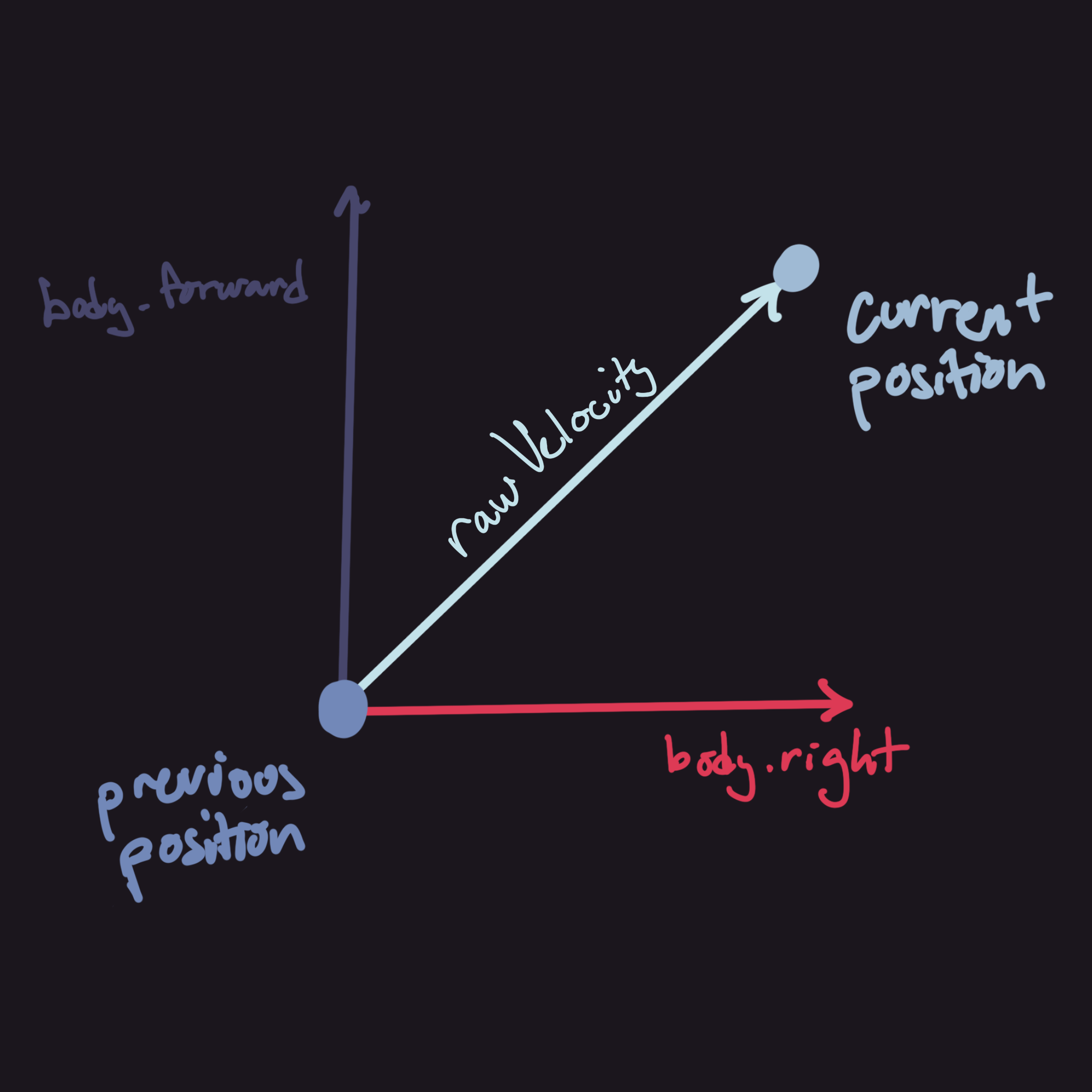
prevBodyPos- this is just last frame's position of the body. It's used to calculate therawVelocity.rawVelocity- this is the velocity computed by simply subtracting the current position byprevBodyPosthen divided byTime.deltaTime. This is, however, projected onto a plane orthogonal tobody.up. The reason for this is to not skew the magnitude when moving up and down.velocity- this is a smoothed version ofrawVelocity. The reason for this is because it causes quite a bit of jitteryness without this. If you're curious, just doDebug.DrawRay(body.pos, rawVelocity);and you will see how unstable it is. This just prevents weird jitteryness in other parts of the code.vMag- this is just the magnitude of thevelocity, it's completely optional but makes debugging easier.
Velocity-Based
These are all calculated using their respective "min max sliders" and a computed t value. Since the t value is so important the calculation is as follows:
float t = tVelocityCurve.Evaluate(Mathf.Clamp01(vMag / theoreticalMaxVelocity));
Essentially what this does is that it first uses the magnitude of the velocity and transforms it into a value normalized by theoreticalMaxVelocity. This does mean that it can go above 1 hence why we add the clamp. After we plug it into the defined curve that gives us more control on how t should change depending on the velocity.
stepTime- this is the time that a step takes given the currenttvalue. This should decrease the faster the spider is moving.leadDist- this is how far to lead each step as when it starts moving quickly, it'll lag behind quite a bit. This should increase the faster the spider is moving. The minimum should be 0 as it will make the spider's resting position have leaded steps otherwise.frontLeanAngle,hindLeanAngle- this is how far thehit.normalshould be rotated aroundbody.right. It should increase the faster the spider is moving. This is used to make the legs somewhat "push off" the ground to take a step.
Other
These are just some uncategorized variables that don't really fit in any of the other groups.
onGround- this is just if all legs are on the ground or not. The calculation for this is kinda janky and I'll probably fix this later.Transform rf, rr, lf, lr- these variables are technically optional but makes the code so much easier to read. These are just references to the joints that are used in both the body height calculation and the body tilt calculation.
Code Logic Explanation
Start
    //  Define points for body calculations
    rf = rightLegs[0].leg.joints[1].jointOrigin;
    rr = rightLegs[^1].leg.joints[1].jointOrigin;

    lf = leftLegs[0].leg.joints[1].jointOrigin;
    lr = leftLegs[^1].leg.joints[1].jointOrigin;

    velocity = Vector3.zero;
This should be fairly self explanatory but it just sets the values to be something. Also using ^ before a number while indexing makes it index from the opposite side.
Update Loop
Freezing LegParent
The next few ones are fairly long so its going to be separated into chunks.
legParent.position = Vector3.zero;
legParent.rotation = Quaternion.identity;
These two lines anchor the legParent at $(0,0,0)$ and resets its rotation. These lines are crucial as it prevents the legs from doubling its own y-angle when rotating the parent. The reason why is because the inverse kinematics script that I had wrote in my other devlog, already calculates and applies the y-angle while in 3D. This means that it applies this angle on top of the already rotated angle due to parenting.
After Leg Initialization
This is inside an if statement that uses legsInitialized() to check whether all the legs are initialized. Access to the documentation of these functions are here: CalculateBodyPosition() and CalculateBodyTilt().
CalculateBodyPosition();
CalculateBodyTilt();
These two lines above just calculate the position and the tilt of the body. These can only be called after the legs are initialized because the body's position and tilt depend on the legs' positions.
rawVelocity = Vector3.ProjectOnPlane((body.position - prevBodyPos) / Time.deltaTime, body.up);

velocity = Vector3.Lerp(velocity, rawVelocity, Time.deltaTime * velocitySmoothSpeed);
vMag = velocity.magnitude;

float t = tVelocityCurve.Evaluate(Mathf.Clamp01(vMag / theoreticalMaxVelocity));

stepTime = Mathf.Lerp(legStepTime.y, legStepTime.x, t);

leadDist = Mathf.Lerp(0, maxLeadDist, t);
frontLeanAngle = Mathf.Lerp(maxFrontLegsLeanAngle.x, maxFrontLegsLeanAngle.y, t);
hindLeanAngle = Mathf.Lerp(maxHindLegsLeanAngle.x, maxHindLegsLeanAngle.y, t);
The code above calculates the velocity and all of the velocity-based variables that are to be used later in other functions. For example, stepTime is used later to determine how long each step is going to take.
t Calculation
Let's talk more about how the math behind this code actually works. We'll go line by line and I'll explain why I wanted to make it the way it is. So first, we have the calculation for rawVelocity. It is fairly simple where we just take a vector from the last frame to this frame then divide it by Time.deltaTime but we do want to project this onto a plane. The reason being is because we don't want any changes vertically to affect any of our calculations. In the diagram, body.right and body.forward are two coplanar vectors that lie on the plane we project the vector body.position - prevBodyPos onto.
This value isn't very stable and just one frame drop can cause it to jitter out of control. We need to take this into account and apply some smoothing. To do this, we can use a simple lerp between the current value of the velocity and rawVelocity. Using velocitySmoothSpeed we can fine-tune this in real-time in the editor.
All of this velocity calculation stuff is just so we can computer our t value used in calculating the stepTime, leadDist and both leanAngles. To finish off this calculation, we divide the magnitude of the current velocity by the theoretical max, normalizing this value between $0$ and $1$. Of course it still can go over if the spider's velocity is higher than the theoretical max so we just need to clamp this value. Lastly we just plug this clamped value into our t curve and scale it accordingly.
Velocity-Based Calculations
The t value we just calculated is to be plugged into a lerp with the two values to get a middle value. It's important that t does not exceed 1 and does not go below 0 or it might not match the values you plugged into the equation.
Finishing Lines
UpdateLegGroup(leftLegs, 0);
UpdateLegGroup(rightLegs, 1);

prevBodyPos = body.position;
The first two lines of this section do a whole bunch of stuff and calculations that I'll talk about later. The last line just updates prevBodyPos since the value isn't used after this line.
User Defined Functions
UpdateLegGroup()
The purpose of this function is to shoot raycasts for each of the legs and check whether its distance to the IK target is greater than minDelta or maxDelta depending on the situation. There are some extra calculations that are done purely for cosmetic reasons (velocity lean and whatnot) so it is possible to remove it if need be.
void UpdateLegGroup(Leg[] legGroup, int offset) { ... }Parameters
Leg[] legGroup- this represents which group of legs we are updating. EitherleftLegsorrightLegs.int offset- this is an offset for the if statement calculations. It affects whether to mark the first leg of the array as part of the first group or the second. Without this, the legs which have the same indices would move together.
Everything in this function is wrapped in a for loop which iterates over each leg as so:
for (int i = 0; i < legGroup.Length; i++) {
    ...
}
While it is possible to use a foreach loop, we want to use i in our calculations later on (especially the alternating legs). First, let's create some local variables.
Leg leg = legGroup[i];
leg.leg.transform.position = leg.pivot.position;

RaycastHit hit;
onGround = Physics.Raycast(groundPos + leg.groundTarget.up *
       maxRaycastDist / 2, -legGroundTarget.up, out hit, maxRaycastDist, groundMask);

float dist = Vector3.Distance(hit.point, leg.leg.target.position);
Okay, so this might look a little weird with all the leg.leg references you might be seeing but that is literally just a reference to the inverse kinematics solver of the leg. If you want, just rename Leg leg to something else to make it a little more readable but I think its fine.
Anyways to explain the code line by line now. So first, we just want to create a local variable because we will be using leg quite a lot. Next we want to anchor the shoulder joint of the leg to the set pivot transform that we assign. Next we want to check if there is a target that we can put the IK target at. By doing so, we can also check whether this leg is grounded or not. This definition of grounded is very loose since it will still count as grounded even if the leg's end effector isn't physically touching the ground (like mid-step or something).
Physics.Raycast(groundPos + leg.groundTarget.up * maxRaycastDist / 2,
        -leg.groundTarget.up, out hit, maxRaycastDist, groundMask);
Since this line is somewhat confusing, I'll explain it further. Of course you can just always separate the values but I tend to want to reduce the lines of code in my scripts for the sake of optimization. Anyways, groundPos + leg.groundTarget.up * maxRaycastDist / 2 is the starting position of the ray. What we want to do is offset the start position to be half of the assigned maxRaycastDist away from the actual groundTarget position. The diagram will illustrate it a little better because its somewhat hard to describe in words.
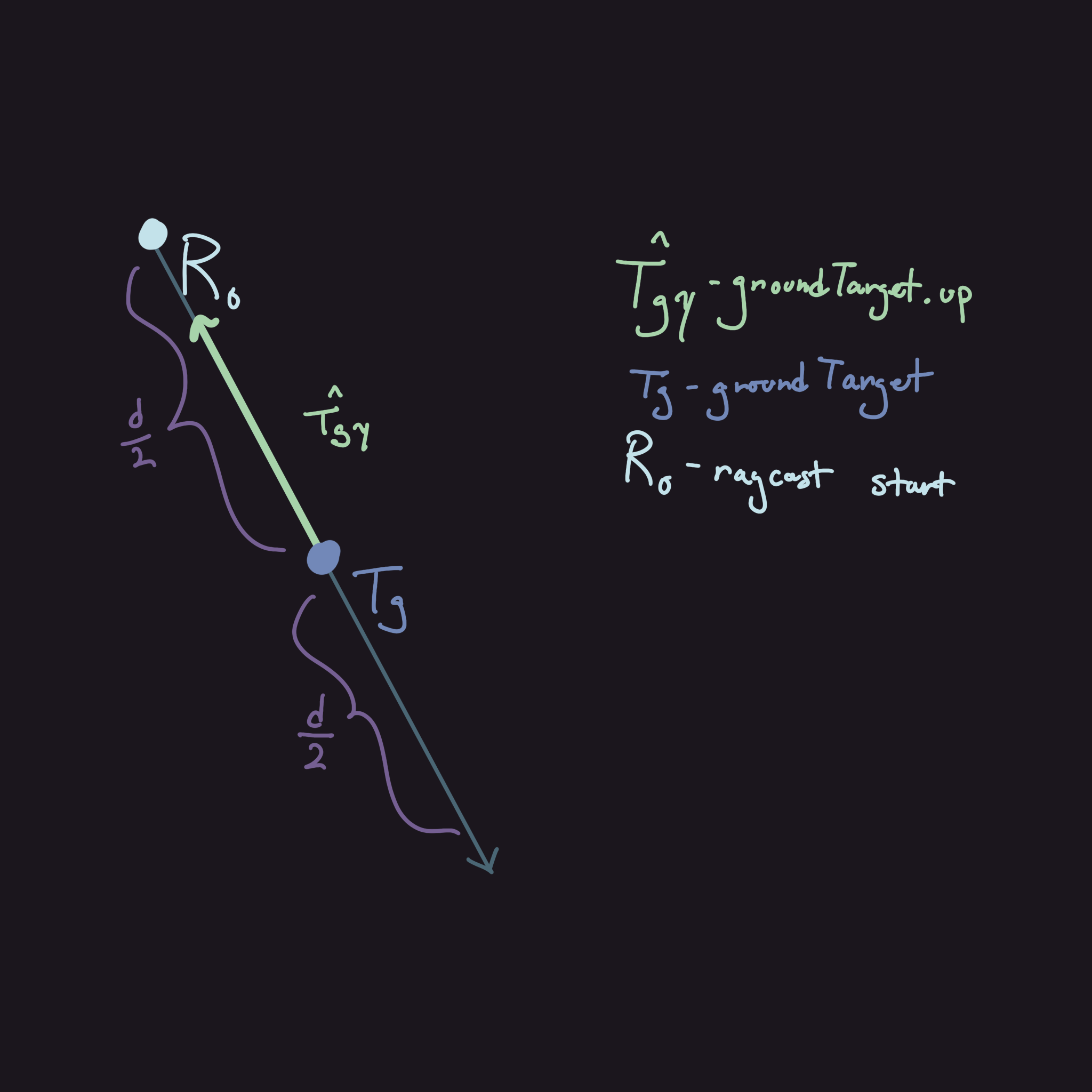
We are assuming that groundTarget is somewhat near the ground meaning that we should overshoot a little using $T_{gy}$. Our last step before we do some calculations after leg initialization is calculating the distance between the raycast's hit point and the leg's target position. This is what we are going to use to determine whether or not to take a step.
Cosmetic Skew Rotation Calculations
This chunk of the function does not work unless the leg has already been initialized, due to this it is wrapped by an if (leg.initialized) { ... }.
Vector3 orthoVelocity = Vector3.Cross(velocity.normalized, body.up).normalized;

float dot = Vector3.Dot(velocity.normalized, Vector3.ProjectOnPlane(leg.leg.target.position - leg.pivot.position, body.up).normalized);

float maxLeanAngle = Mathf.Lerp(hindLeanAngle, frontLeanAngle, (dot + 1) / 2);

float distanceLean = -maxLeanAngle * Mathf.Clamp01(dist / maxDelta);

leg.skewRotation = Quaternion.Slerp(leg.skewRotation, Quaternion.AngleAxis(distanceLean, orthoVelocity), Time.deltaTime * legRotSmoothSpeed);

leg.leg.target.up = leg.skewRotation * leg.rawUp;
To start with these calculations, we need to get the vector that we want to rotate around. First, we need to think how we want this to rotate. Initially, I did want to rotate the vector made from the leg's second joint position - body's position but it didn't seem to achieve what I wanted it to. I wanted it to rotate around the body instead of on an axis but I had to compromise with using an orthonormal vector given by body.up and velocity. Here's a diagram of what the vector should look like and how we calculate it:
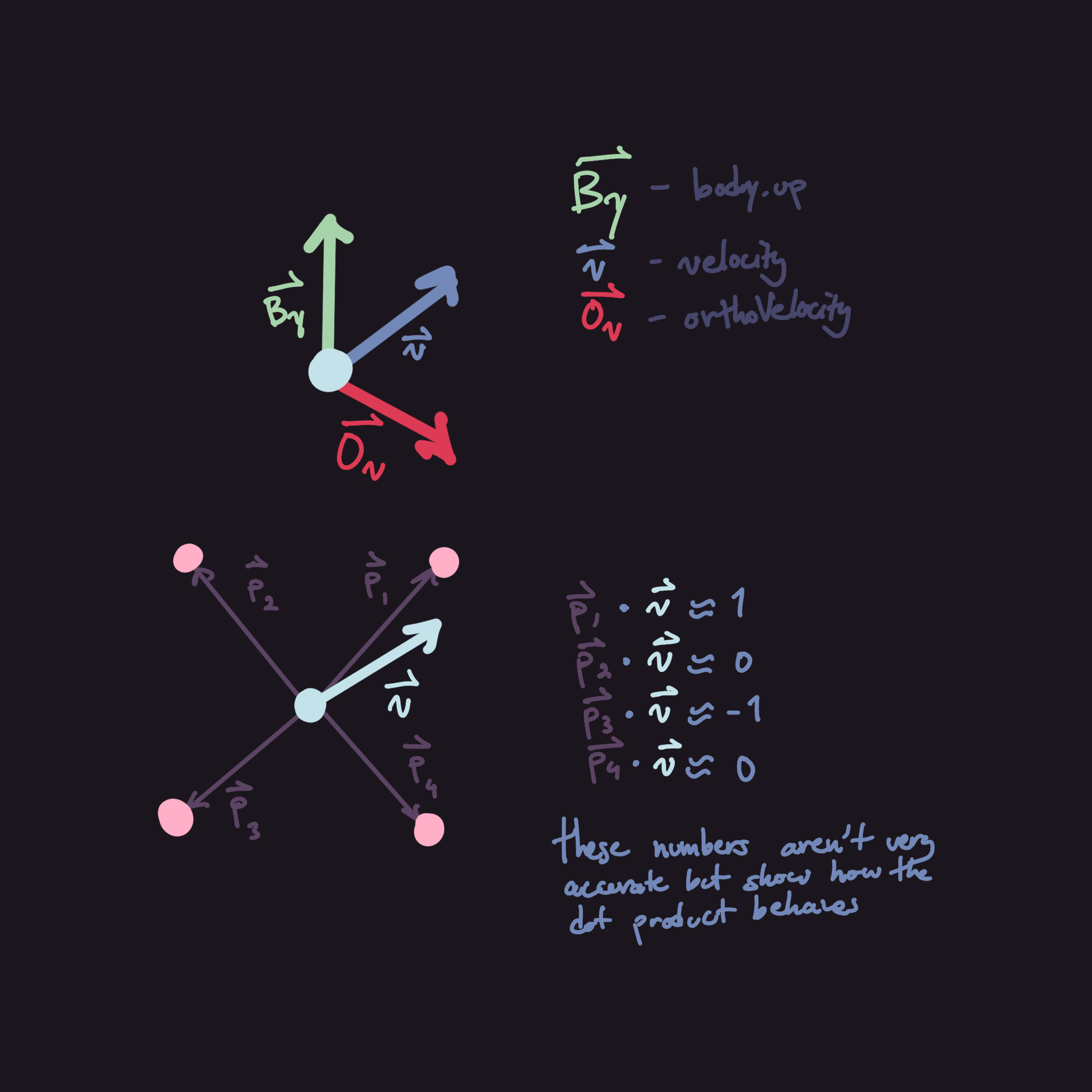
After calculating this vector, we need to get the dot product between the normalized velocity and normalized vector similar to which I had described earlier. This dot product is what's used to determine whether the leg is a front leg or hind leg. While this may seem simple where we can just label the first half of each leg group as front legs and latter half as the hind legs, this isn't actually correct. This is due to the fact that the velocity isn't always along body.forward, sometimes it might be moving to the side and we need to lean accordingly.
Anyways, the next step is to actually calculate how much we need to rotate. To do this we just need to lerp between hindLeanAngle and frontLeanAngle which we calculated using the velocity in the update loop. The t value for this lerp is (dot + 1) / 2 as dot's range is $[-1, 1]$ so we must transform that onto a $[0,1]$. We can then use this maxLeanAngle value and multiply it by how close the IK target's distance is to the max distance required for a step to occur.
Afterwards, we just calculate rotation by using a simple Slerp and then multiplying the up vector of the IK target by this value.
After Lean Angle Calculations
This code is outside of the if statement that the previous block of code was in. This chunk serves to check whether the spider should take a step or not.
if (leg.isStepping || (groupOneMoving != (i % 2 == offset) && leg.initialized))
    continue;

if ((onGround && dist > maxDelta) || !leg.initialized
|| (leg.restTimer < 0f && dist > minDelta))
    UpdateLegPosition(leg, hit.point, hit.normal);
leg.restTimer -= leg.restTimer < 0 ? 0 : Time.deltaTime;
The first if statement in this chunk is to prevent starting another step when some conditions aren't met. The first condition is pretty self-explanatory where we only want to take a step if it isn't already doing so. The second condition is a little more complicated. Essentially, what we want to check is whether or not the leg should be stepping at the current time. Since we have two groups, separated by alternating legs on either side, we use this condition (groupOneMoving != (i % 2 == offset)). i % 2 == offset alternates between true and false depending on offset and i.
The second if statement checks a bunch of things before taking a step. The first condition, onGround && dist > maxDelta is pretty self-explanatory, the second !leg.initialized is done as the code run through the if statement is what initializes the legs. The third condition is similar to the first one but we want to check whether the leg has rested for long enough and the distance is large enough for it to want to correct itself.
The last line is just ticks down the independent timer for each of the legs that tracks when it's okay to correct itself.
UpdateLegPosition()
This function serves two purposes, to initialize the leg and to call the interpolation function to start a step.
void UpdateLegPosition(Leg leg, Vector3 pos, Vector3 normal) { ... }Parameters
Leg leg- leg to updateVector3 pos- position that the leg should move towardsVector3 normal- the normal vector given by the raycast
Leg Initialization
if (!leg.initialized) {
    leg.leg.target.position = pos;
    leg.leg.target.up = -normal;
    leg.rawUp = -normal;

    leg.skewRotation = Quaternion.identity;

    leg.initialized = true;
    return;
}
This code simply just initializes the leg by setting some default values.
Stepping Code
if (!leg.isStepping) {
    leg.restTimer = timeBeforeRest;

    leg.startInterpolationTime = Time.time;
    leg.startPosition = leg.leg.target.position;
    leg.startUp = leg.leg.target.up;

    leg.targetPosition = pos;
    leg.targetUp = -normal;

    leg.rawUp = -normal;

    leg.isStepping = true;

    numSteps++;

    StartCoroutine(InterpolateLeg(leg));
}
Most of the code just sets up the initial values so that the InterpolateLeg coroutine function works correctly. Each of the variables and what they do are listed below:
leg.startInterpolationTime- this is used to calculate thetvalue while interpolating since we need to store the time elapsed since the function callleg.startPosition- theavalue of thelerpleg.startUp- theavalue of theSlerpleg.targetPosition- thebvalue of thelerpleg.targetUp- thebvalue of theSlerpleg.rawUp- the up vector used in lean rotation calculations within the update loopleg.isStepping- this just prevents the code from resetting the values when it's mid-step
InterpolateLeg()
This isn't actually a function but rather a coroutine. This can technically be replaced with a thread but there really isn't a reason to.
IEnumerator InterpolateLeg(Leg leg) { ... }There is only one input Leg leg which is just the leg that we want to do the step. Technically there are others but they are just contained within the Leg class.
Before we start the interpolation, we need to initialize some variables.
float t = 0f;
float localStepTime = stepTime;
t is our value which is slowly going to approach 1 linearly. localStepTime is set to what stepTime is at the time of the step starting as stepTime changes with velocity.
While Loop
For those who don't know what coroutines are, they essentially act as threads but run sequentially with other scripts. This means that it can run a while loop but it doesn't work like a thread where they are completely run in parallel. For example, if a while loop is stuck using a while (true) { ... } or something similar, everything will freeze unless there is a return inside of the loop. An example of a type of return is the yield return null; this essentially just waits 1 frame continues with the loop.
Anyways, our code is wrapped around while (t < 1f) { ... }. We bound our t value to between 0 and 1 since lerps and slerps both use that range.
First, we need to talk about how we calculate t. Within this loop, we calculate t as so:
t = Mathf.Min(1f, (Time.time - leg.startInterpolationTime) / localStepTime);Essentially, what we are doing here is calculating Time.time - leg.startInterpolationTime which gives us the time elapsed since the start of the step. Then we divide it by localStepTime which fuzzily bounds the range to $[0,1]$. Then we use Mathf.Min to ensure that we don't overshoot.
float height = legStepHeightCurve.Evaluate(t);

Vector3 targetPos = Vector3.Lerp(leg.startPosition, leg.targetPosition, t) + body.up * height;

Quaternion startRot = Quaternion.LookRotation(leg.leg.target.forward, leg.startUp);
Quaternion endRot = Quaternion.LookRotation(leg.leg.target.forward, leg.targetUp);

Quaternion rot = Quaternion.Slerp(startRot, endRot, t);

Vector3 targetUp = rot * Vector3.up;

leg.leg.target.position = targetPos;
leg.leg.target.up = targetUp;

yield return null;
The first line just uses our animation curve to calculate the height of the leg from off the ground. We use this scalar height value then just multiply it by body.up and add it to the lerped position to get our current IK target position. Rotation is somewhat similar but we just use Quaternions to do the same. We first define our start and end quaternions using Quaternion.LookRotation which creates a quaternion given a forward and upward vector. The last part of the while loop just applies our interpolated values then waits until the next frame to do the same once again.
Cleanup
if (++stepsCompleted >= numSteps) {
    groupOneMoving = !groupOneMoving;
    stepsCompleted = 0;
    numSteps = 0;
}

leg.isStepping = false;
The cleanup isn't much for this. We just need to reset the counter if this is the last leg of the leg group then just reset its isStepping boolean so it works for the next step.
CalculateBodyPosition()
These next two functions are fairly math heavy but the code should be fairly simple to understand.
void CalculateBodyPosition() { ... }Solving for the Midpoint
I want to start with our approach. What we want to do is try to find the intersection of the two vectors that are flat against a plane constructed with body.forward and body.right as their axes. Once we get this point of intersection (POI), we can then project it back onto the non-flattened vectors to find their desired heights. Using these heights, we take their average then add an offset for further tweaking. This is the gist of what we are trying to do but here's the math if you're curious.
First let's define our variables:
- $\vec p, \vec q$ - Vectors constructed using $p_1,p_2,q_1$ and $q_2$
- $\vec a, \vec b$ - $\vec p,\vec q$ projected onto the plane orthogonal to
body.up
Projecting the vectors onto the plane is fairly simple. We just need to remove the body.up component of the vector. To do this, we can project a vector $\vec v$ onto body.up (we'll refer to this as $\vec u$ from now on) and get the $\vec u$ component of it. We just need to subtract this value from $\vec v$ to get the projected vector.
$$
\vec a=\vec p-\frac{\vec u\cdot\vec p}{|\vec u|^2}\vec u
$$
$$ \vec b=\vec q-\frac{\vec u\cdot\vec p}{|\vec u|^2}\vec u $$
Next we need to localize these vectors into the body's coordinate frame. We do this by using the three vectors, body.up, body.right and body.forward. This is fairly simple and just requires us to do a few dot products. Since body.up is $\vec u$, body.right and body.forward will be named $\vec r$ and $\vec f$ respectively. You will need to do this for $\vec p,\vec q, \vec a$ and $\vec b$. As an example, here's $\vec p$ localized:
$$
\vec p_L={\vec p\cdot\vec r,\vec p\cdot\vec u,\vec p\cdot\vec f}
$$
Now we should solve for the POI of $\vec a$ and $\vec b$. To do this, we can just pretend the forward axis is a y-axis. Using the vector definition and the point version of the, we can derive an equation to define a line like so:
$$
\vec p=\vec mt+\vec p_0
$$
$$ y=\frac{m_y}{m_x}(x-x_0)+y_0 $$
We just need to solve for the $x$ value when we repeat this for $\vec q$ as we will have two equations then. Here's the code for the math:
Vector3 localizeVector(Vector3 right, Vector3 up, Vector3 forward, Vector3 v) {
    return new Vector3(
     Vector3.Dot(right, v),
        Vector3.Dot(up, v),
        Vector3.Dot(forward, v)
    );
}

Vector3 localizeVector(Transform t, Vector3 v) {
 return localizeVector(t.right, t.up, t.forward, v);
}
The function above was something I forgot to mention since it is only really used in this function. There isn't really a need for it but it makes the code somewhat more readable.
Vector3 p = rr.position - lf.position;
Vector3 q = lr.position - rf.position;

Vector3 pLocal = localizeVector(body, p);
Vector3 qLocal = localizeVector(body, q);

Vector3 lfLocal = localizeVector(body, lf);
Vector3 rfLocal = localizeVector(body, rf);

Vector3 a = localizeVector(body, Vector3.ProjectOnPlane(p, body.up));
Vector3 b = localizeVector(body, Vector3.ProjectOnPlane(q, body.up));

float aSlope = a.z / a.x;
float bSlope = b.z / b.x;

float x = (aSlope * lfLocal.x - bSlope * rfLocal.x + rfLocal.z - lfLocal.z) / (aSlope - bSlope);

float tP = x / pLocal.x;
float tQ = x / qLocal.x;

float yP = tP * pLocal.y;
float yQ = tQ * qLocal.y;

float avgY = (yP + yQ) / 2f;

if (onGround)
    body.localPosition = Vector3.up * (avgY + distToLegCentre);
This code is quite long so I'll list out each step to hopefully make it easier to understand:
- The first two lines define the
pandqvectors using our four points. - Store and localize these vectors so we can isolate the
body.upcomponent of the vector for other calculations. - Store and localize the initial points of the vectors to correctly calculate the
xvalue of the intersection. - Create two new vectors
aandbwhich are the vectors that we calculate the intersection of. - Store the slopes of these vectors and calculate the
xcomponent of the intersection. - Use this
xvalue to calculate thetvalue along each of the original localized vectors. - Get the
ycomponent of the intersection on each vector. - Average these
yvalues to get the midpoint between the intersections. - Use this calculated average along with the
distToLegCentrevariable and apply it onto the body's local height.
CalculateBodyTilt()
void CalculateBodyTilt() { ... }The approach I took was to create a plane of best fit for the four points. Using this plane we want rotate the body so that body.up becomes equal with the normal of the plane. Since I'm not experienced enough in data science (and I think it might be too expensive), I decided to approximate the plane of best fit by using averages. This method is probably more annoying to code but it should be less expensive.
To start, we need to grab 4 normal vectors from the legs. Make sure that they all face in the same direction. I don't mean that they are all equal but I mean more than they lie on the same side of the plane. Averaging these vectors we get a normal vector that somewhat encompasses all four normal vectors.
Vector3 norm1 = Vector3.Cross(lf.position - rf.position, rr.position - rf.position).normalized;
Vector3 norm2 = Vector3.Cross(rf.position - rr.position, lr.position - rr.position).normalized;
Vector3 norm3 = Vector3.Cross(rr.position - lr.position, lf.position - lr.position).normalized;
Vector3 norm4 = Vector3.Cross(lr.position - lf.position, rf.position - lf.position).normalized;

Vector3 avg = (norm1 + norm2 + norm3 + norm4) / 4;
The following lines rotate the body to fit the plane. To do this we need to get two vectors, a forward vector and an up vector. Since body.forward isn't necessarily orthogonal to the plane's normal vector, we have to project the body.forward onto the plane.
legsInitialized()
bool legsInitialized() {
    foreach (Leg l in leftLegs) if (!l.initialized) return false;
    foreach (Leg r in rightLegs) if (!r.initialized) return false;
    return true;
}
This function is pretty simple and it just returns whether all legs are initialized.